
Fast for a spot check, but intent and repeatability usually live in someone’s memory.
Every dollar of traffic runs through a link you haven’t checked.Your traffic runs through links you haven’t checked.Preflight it before launch →
Before you spend another dollar on traffic, make sure every buy button points to the right place.
LaunchGuard maps each selected CTA to the destination you approved, shows what actually happens, and gives you the evidence and repair plan to fix the route before buyers click it.
- ✓ Runs locally on Windows & macOS
- ✓ Deterministic workflow works without AI
- ✓ Built for pre-traffic CTA checks
Real product workspace Focused evidenceRepair plan
Focused evidenceRepair plan99 / 99v0.5.1 technical regression checks passed on 4 Aug 2026PR-001
3 formatsPortable HTML, Markdown and JSON report outputsPR-002
Local-firstRun history and report artifacts remain on the buyer’s machinePR-003
Before LaunchGuard
Clicks without a route recordIntent, evidence and rerun state stay disconnected.
THE PRELAUNCH BLIND SPOT
A link can work — and still send buyers to the wrong place.
Manual clicking and generic link checks can confirm that a page opens. They do not automatically preserve your approved destination, the observed route, focused evidence, a repair procedure, and a post-fix comparison in one reusable record.
LaunchGuard turns “I clicked around” into a reviewable route record.
WHY CLICKING ALONE FALLS SHORT
A working link is not the same as the intended route.
LaunchGuard turns your route decisions into a repeatable launch record: approved destination, observed result, focused evidence and verified rerun.
Can report HTTP health while a live CTA still leads to the wrong offer or step.
Show what was visible, but not necessarily what was declared or how the repair was verified.
35-SECOND REAL PRODUCT WALKTHROUGH
Watch the evidence workflow before reading the offer.
Recorded directly from LaunchGuard v0.5.1: safe sample, CTA confirmation, selected checks, report, Action Plan and Human Verification.
- Recorded from the current product
- Complete safe-sample workflow
- English captions and full transcript
SAFE, LOCAL MECHANISM DEMO
● Sample data onlyInteractive sample — no website is contacted
Selected CTAGet instant access
Declared/checkout
ObservedNot run
READY TO COMPARE
Declared /checkout
Run one deterministic sample to see how LaunchGuard preserves intent, observation and repair evidence.
THE LAUNCHGUARD LOOP
Map → Confirm → Evidence → Fix → Rerun
One declared workflow carries the intent, evidence and repair state from the first check to the final rerun.
Map
Declare the funnel pages and destinations that should be approved before testing.
Confirm
Review discovered CTAs and explicitly confirm the intended destination for every selected link.
Evidence
Record the observed destination, status and focused context instead of relying on memory.
Fix
Use a prioritized Action Plan with the change location, implementation steps and done conditions.
Rerun
Repeat the same declared check and preserve before/after remediation evidence.
One continuous preflight record
One route. One record.Each station preserves the context needed by the next.
CLEAR BOUNDARIES
Know exactly what LaunchGuard checks—and what stays in your hands.
This is the complete operating boundary in one place, immediately before you decide whether the workflow is worth $19.
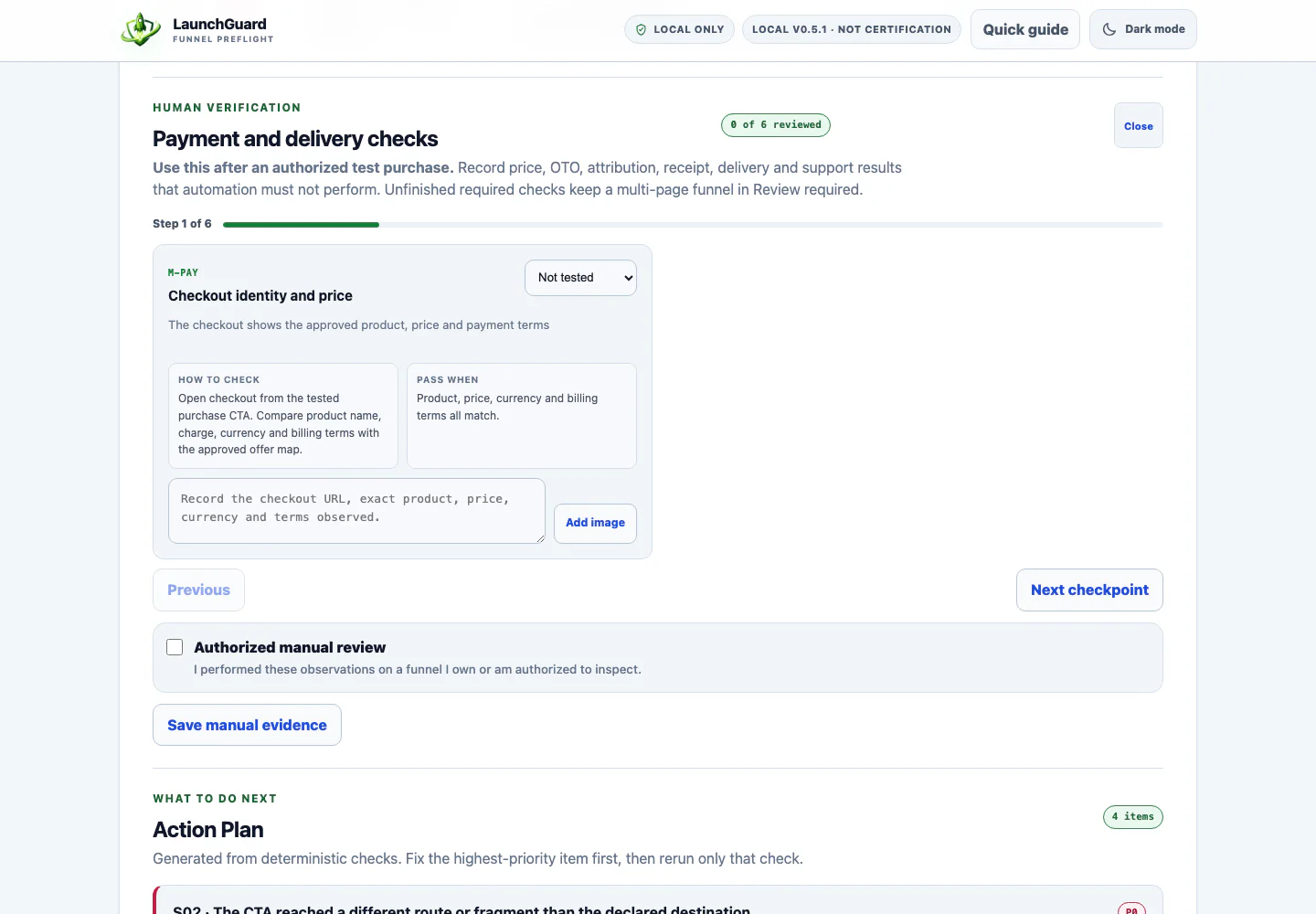
Automation handles the safe public checks. You record the protected buyer journey.
Payment & priceOTO accept / declineAffiliate attributionReceipt emailDelivery accessSupport / refund access
- Use LaunchGuard only on funnels you own or are explicitly authorized to inspect.
- It records declared public routes; it does not submit payment, bypass login/CAPTCHA, or automate protected OTO decisions.
- It does not certify an entire funnel or promise platform approval, conversion or revenue.
- The safe sample and illustrative scenarios demonstrate the mechanism; they are not customer results or evidence that an external funnel was inspected.
- Run artifacts stay local. Optional AI explanations send only the selected payload to the provider you configure.

PROTECTED CHECKPOINTSYou stay in control of the steps that require a real buyer.
LaunchGuard keeps those six observations beside the automated route evidence.
FOUNDING RELEASE · $19 ONE TIME
Fix the traffic path before you pay to send people through it.
Get the complete v0.5.1 preflight workflow for Windows and macOS, including the safe sample, evidence reports, Action Plan and Human Verification.
99/99 regression checksCore workflow works without AIPortable runtime on Windows & macOS
NOT JUST A RED BADGE
Evidence that leads to the next action.
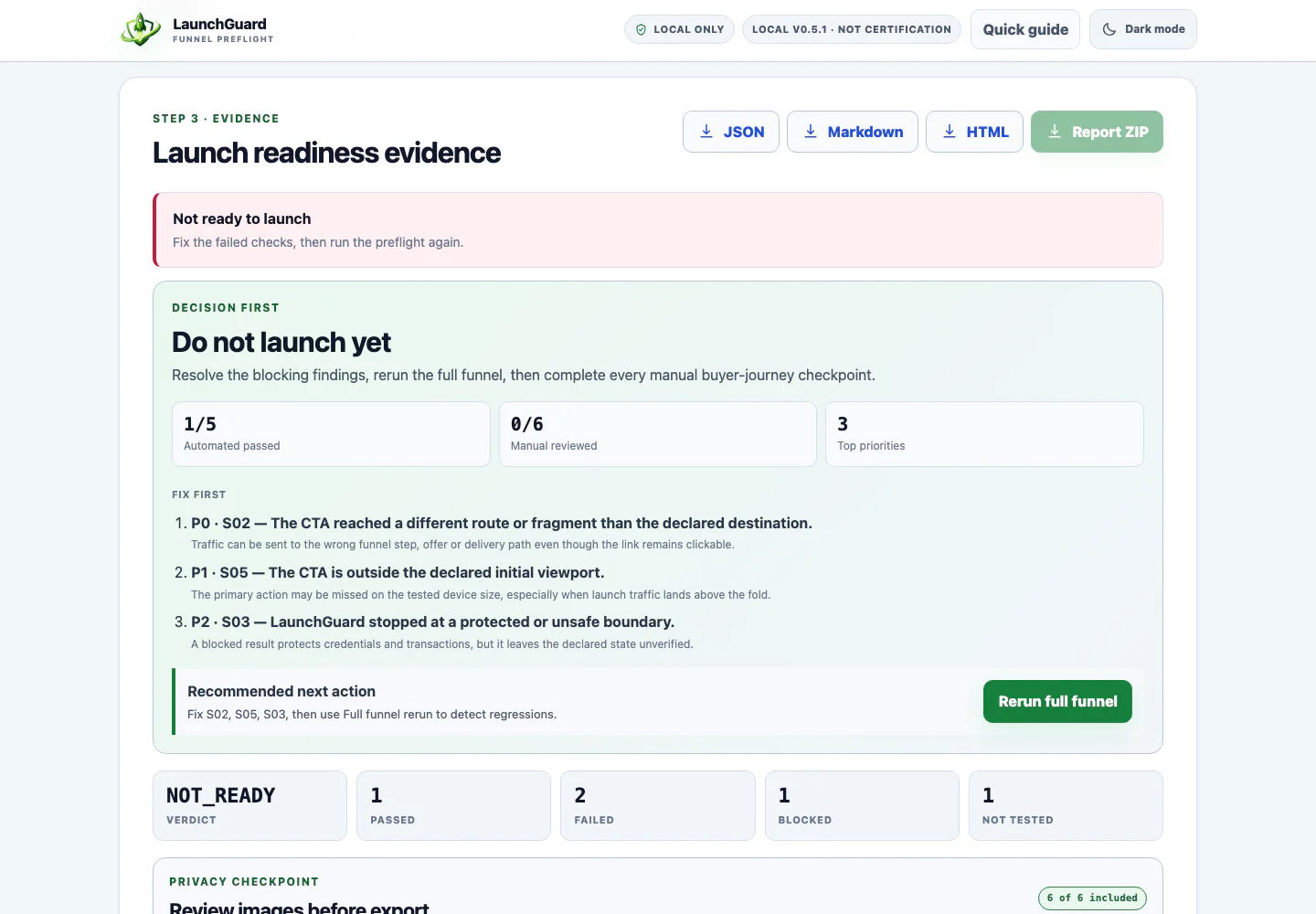
The report keeps the destination, focused visual context, exact repair instruction and completion condition together.
01
See the route finding in context
Compare declared intent with the observed destination and inspect the evidence attached to the selected CTA.
02
Leave with a concrete repair procedure
Every deterministic Action Plan states what failed, why it matters, where to change it, how to fix it, done conditions and the exact rerun.
Where to changeDone whenExact rerun
 Current product preview
Observed mismatch→Exact repair→Same-check rerun
BEFORE / AFTER REMEDIATION
Preserve the failed state, then prove the rerun.
This safe example shows the core comparison LaunchGuard is designed to retain. Toggle the record to inspect the exact route change.
Mismatch → repair → rerun
Bundled safe sample · S02
Declared destination
/checkoutObserved destination
Destination mismatch/demo/wrongThe rendered secondary CTA does not match the approved route.
DESIGNED BUYER OUTCOMES
Know what to fix before the traffic arrives.
Turn every selected CTA into a reviewable decision: approved destination, observed route, evidence, repair and rerun.
- 01See which selected CTA does not match its declared destination.
- 02Keep the exact expected and observed route beside focused evidence.
- 03Understand why the finding matters and where to make the change.
- 04Follow concrete repair steps, done conditions and a retest procedure.
- 05Record payment, OTO, receipt and delivery checkpoints that remain human-only.
BUILT FOR REAL FUNNEL WORK
Two ways the workflow fits a launch.
A live CTA reaches a real page — but not the approved checkout.
Compare the declared /checkout route with the observed /demo/wrong destination, inspect the attached evidence, follow the repair instruction, and preserve the successful rerun in the same record.
Public routes and protected launch steps need different evidence.
Document the declared public routes, then bring payment, accept/decline, receipt and delivery observations into the same launch record for one complete review.
You own the launch decision.
- You operate a WarriorPlus, JVZoo or comparable multi-step funnel.
- You want route intent, evidence and retest state in one reviewable record.
- You want a repeatable pre-traffic check instead of another loose checklist.
Traffic, promos and launch-day changes.
- A paid traffic campaign starts.
- An affiliate mailing sends buyers into the funnel.
- A checkout, CTA or OTO route is edited after QA.
ONE COMPLETE PRODUCT
Everything needed for your next funnel preflight.
The founding release is a local-first app and guide bundle for operators who want a repeatable funnel-check record before traffic goes live.
- ✓LaunchGuard v0.5.1 local app
- ✓Windows portable-runtime launcher
- ✓macOS portable-runtime launcher
- ✓Safe sample and guided onboarding
- ✓Route-aware checks and focused evidence
- ✓Deterministic Action Plan with optional AI explanation
- ✓Human Verification workspace
- ✓Before/After Remediation and rerun comparison
- ✓Portable report export and privacy review
- ✓Quick Start, troubleshooting, privacy and support guides
Complete LaunchGuard delivery

USE IT, THEN DECIDE
14-Day Launch-Clarity Guarantee
Use the local workflow for fourteen calendar days. If it is not the right fit for your launch process, request a refund for any reason within that window.
DECIDE WITH CONFIDENCE
Questions that help you choose—and get your first result.
Can’t I just click through the funnel myself?+
You should still use human judgment. LaunchGuard adds declared route intent, coverage, focused evidence, repair steps and rerun history so the final check is easier to review and share.
Does it work without AI?+
Yes. The findings, verdict, evidence and deterministic Action Plan work without AI. Optional AI explanations use the provider key you choose to enter.
Do I need Node.js?+
No manual Node.js installation is required. On Windows or macOS, LaunchGuard can prepare a private verified portable runtime when a compatible system Node is unavailable. The first launch needs internet access.
What exactly do I receive after purchase?+
You receive the LaunchGuard v0.5.1 local app, Windows and macOS portable-runtime launchers, safe sample, guided workflow, evidence and report exports, Action Plan, Human Verification, Before/After comparison, and setup and troubleshooting guides.
Can I use it on a one-page sales funnel?+
Yes. Start with the sales page, confirm the intended destination for each selected purchase CTA, and preserve the result. Multi-page projects are available when your funnel has more steps.
How do I get my first useful result?+
Open the bundled safe sample first. It walks you through Target, Confirm and Evidence so you can see the complete report before mapping an authorized live funnel.
Why buy this instead of checking every link manually?+
Manual clicking tells you what happened once. LaunchGuard keeps the approved destination, observed route, evidence, exact repair steps and same-check rerun together so you can review the launch decision instead of reconstructing it from memory.
Is $19 the complete product?+
Yes. One $19 payment includes the complete LaunchGuard v0.5.1 preflight workflow described on this page. There is no required upgrade, order bump or paid add-on needed to produce the promised report.

BEFORE THE TRAFFIC ARRIVES
Make the next funnel check a record you can actually review.
Map the route. Capture the evidence. Fix the mismatch. Preserve the rerun.
Start with LaunchGuard